What Is Mivo Screen Time App Doomscrolling
Indian Express
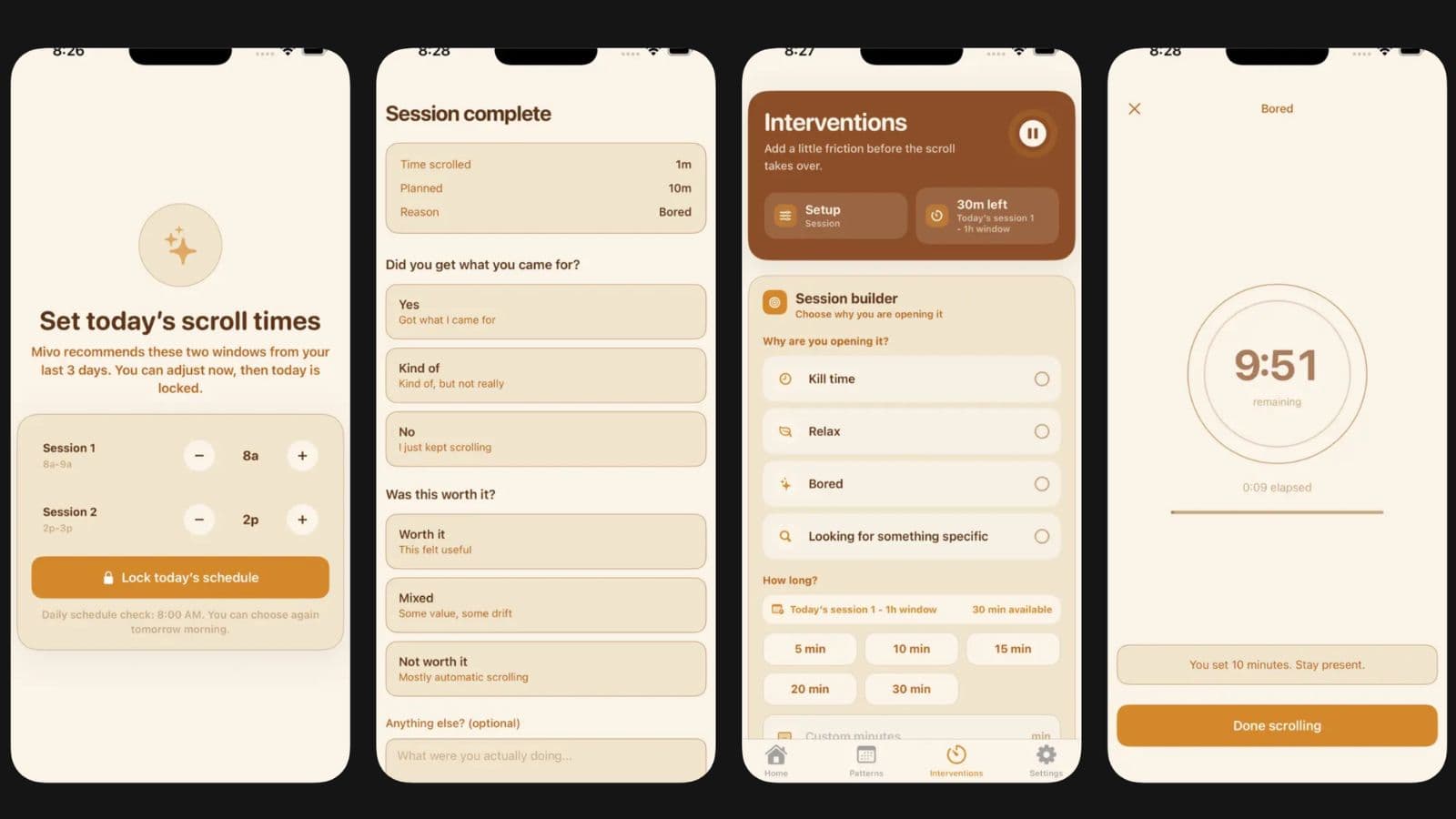
With online doomscrolling becoming an increasingly common habit among users of all ages, a new wave of apps is looking to help people avoid losing hours to endless social media feeds.
One such newly launched app is Mivo Scrolling. It is described as a mindful screen time app that helps users keep track of their screen times and usage patterns while providing additional insights into their daily habits.
On the surface, Mivo does not look very different from the dozens of other screen time management apps. However, what sets it apart is Mivo’s no-shaming approach that lets the user decide if they want to continue using their phone.
This is in stark contrast to most screen time apps that primarily look to pull users away from their devices by imposing strict limits. Instead, Mivo is designed to encourage users to be more aware of why and how they are using their phones. It is a free-to-download app that is currently available in Apple’s App Store.
A growing number of companies are attempting to cater to users looking to tackle smartphone or social media addiction. For instance, another app called Bond uses AI to auto-generate lifestyle suggestions for the user. It comes amid heightened concerns over the impact that social media can have on children’s mental health.
Earlier this month, Google unveiled a new app called Dreambeans that has been specifically built to help users reduce doomscrolling – the tendency to continue to surf or scroll through bad news.
“Most screen time tools try to restrict people after the habit is already happening. Mivo adds a small reflection moment right when someone opens a social app, so they can pause and ask why they’re opening it before falling into an automatic scroll,” Pranshu Raithatha, the developer behind Mivo Scrolling, was quoted as saying by TechCrunch.
Most of the features in the Mivo app are designed to let users be more intentional about their time online. It is part of a new slow tech movement that forces users to rethink their relationship with technology.
This means that there are no options to outright block certain apps. However, users can set customisable time limits for how long they wish to scroll on specific platforms. They can, for instance, schedule daily scroll sessions with one-hour windows and select the apps that they want to use during that time.
When the session is done, users will see a friendly pop-up reminder that nudges them to think about why they are scrolling. Are they bored, distracted, or just trying to relax? Users are also asked if the time they spent scrolling was useful or if they simply got lost in the endless cycle.